
Does SSL Improve SEO? The Truth About HTTPS & Rankings
Secure Socket Layer, or SSL, certificates are symbols of trust and security. They show that a website has taken steps to encrypt its data and connections, providing a safer experience for the end user. It is a wise idea to invest in SSL technology, but does SSL improve SEO at all, or is it purely a security advantage?
That is a big question for many site owners and digital marketers worldwide. To answer it, you must understand the connection between SEO and SSL. This will assist you in making the smartest, most cost-effective, and value-adding decisions for your site. This guide will cover all you need about SSL technology and its impact on Google rankings.

Understanding SSL Certificates
We will begin by answering the question, “What is SSL?” and briefly overview this technology.
As we mentioned, SSL stands for “secure sockets layer.” It is an internet security protocol that has been around since 1995, when it was designed and developed by Netscape to improve online privacy and secure communications. SSL works by encrypting the data that passes across the web between a website and the website’s users. Sites with SSL enabled have “HTTPS” and little padlock browser icons in their URLs.
Interestingly, even though the term “SSL” is still in common parlance, secure sockets layer technology has mostly been replaced with TLS, or “transport layer security,” on modern websites. TLS is a more recent and advanced security protocol (developed in 1999), and it addresses some of the shortcomings of SSL. Most “SSL certificates” you can buy today offer TLS protection.
The Role of SSL in Website Security
The way SSL works is straightforward. It encrypts all data that passes between a site and its users across the web. That means anyone else (like hackers) trying to view or access that data will have a harder time doing so than they would if it was not encrypted. Even if they can view it, they will see a jumbled mixture of seemingly random symbols rather than real information.
SSL also digitally signs all secured data to ensure it remains intact and protected for the full duration of its journey to its recipient. Plus, it conducts a secure handshake between the site and the servers, verifying that both parties are legitimate before any data passes.
As mentioned above, sites with SSL certificates have an “S” after the “HTTP” part of their web address. Also, in most common browsers like Chrome, Edge, and Firefox, there is a little padlock icon, which users can click to learn more. The padlock is a sign that the site is secure and trusted, and users can feel more secure on such sites.
SSL as a Google Ranking Factor
In 2014, Google confirmed that SSL was a ranking factor in its SEO algorithm – in other words, the company confirmed that having an SSL certificate helps sites appear higher on results pages. However, the company has clarified this point, stating that SSL is only a minor ranking factor. Thus, getting a certificate will not provide a very large, instant boost to a site’s SEO performance.
Experts have since conducted various studies on the impact of SSL on SEO. They have concluded that SSL helps SEO performance and generally leads to a mild or moderate increase in rankings. However, confirming Google’s declarations, these studies also show that SSL alone is not a large enough factor to impact rankings significantly.
Indirect SEO Benefits of SSL
Before writing off SSL as only a “minor ranking factor,” it is important to understand its indirect and long-term benefits and how those benefits can also play a part in boosting SEO scores.
- Enhanced User Experience – Sites with SSL certificates provide safer and more pleasant experiences for users through their encryption technology and visuals, like the “HTTPS” URL code and padlock symbols. Because of this, users are more likely to engage with such sites and return to them in the future.
- Browser Warnings – Sites without SSL certificates will typically cause a browser to display a “Security Warning” message to prospective visitors. When visitors see these messages, they are much less likely to proceed and will often leave the site and switch to a secure alternative. Sites without SSL can, therefore, significantly impact traffic and bounce rate.
In simple terms, a site with an SSL certificate is much more likely to receive high amounts of consistent traffic, with fewer people clicking away from it or blocking it from their browsers. The more engagement and traffic you get over time, the more your SEO performance should improve.
Free or Paid SSL Certificates
Choosing between free and paid SSL largely depends on your site’s size and how much traffic you expect.
Free SSL certificates are fine for personal blogs and small business websites with low traffic. Yet, they only offer basic levels of encryption, which will not be enough for larger sites that handle more traffic and significant amounts of sensitive data. For such businesses, a paid SSL certificate with superior security standards is the way to go.
Implementing SSL: Best Practices
To implement SSL technology effectively, it is important to understand the specifics and different sorts of certificates available.
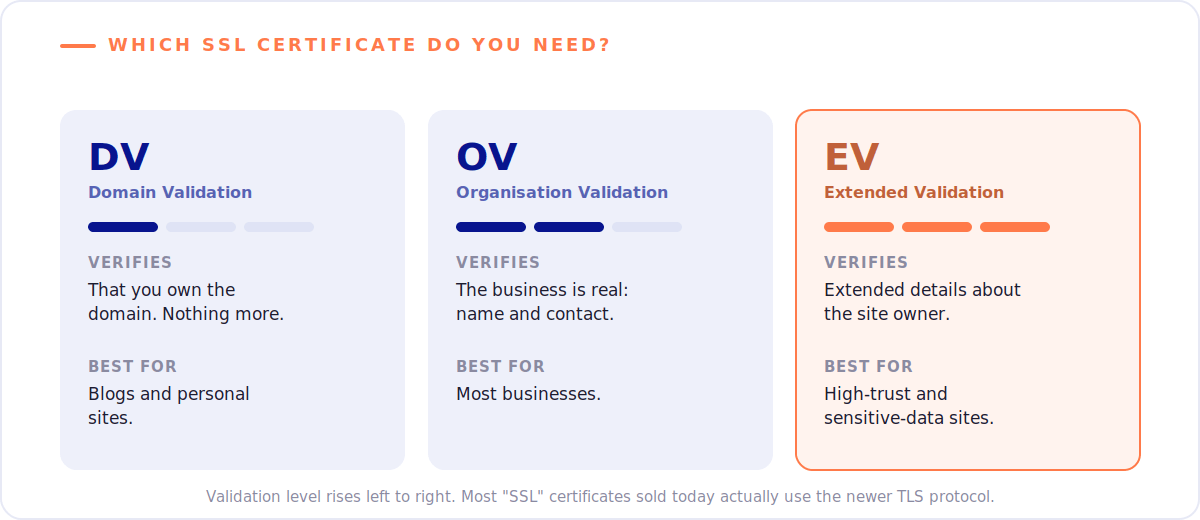
There are three main varieties:
- Domain Validation (DV): The most basic and usually the cheapest. It simply proves that you are the verified owner of your website’s domain. This is fine for blogs and personal sites but not much else.
- Organisation Validation (OV): This proves that the site’s owner is legitimate and validates their status, name, and contact information. It is helpful for most businesses.
- Extended Validation (EV): EV encryption is the highest level, verifying more information about the site owner. You can confirm its presence by the green highlight in the browser bar.
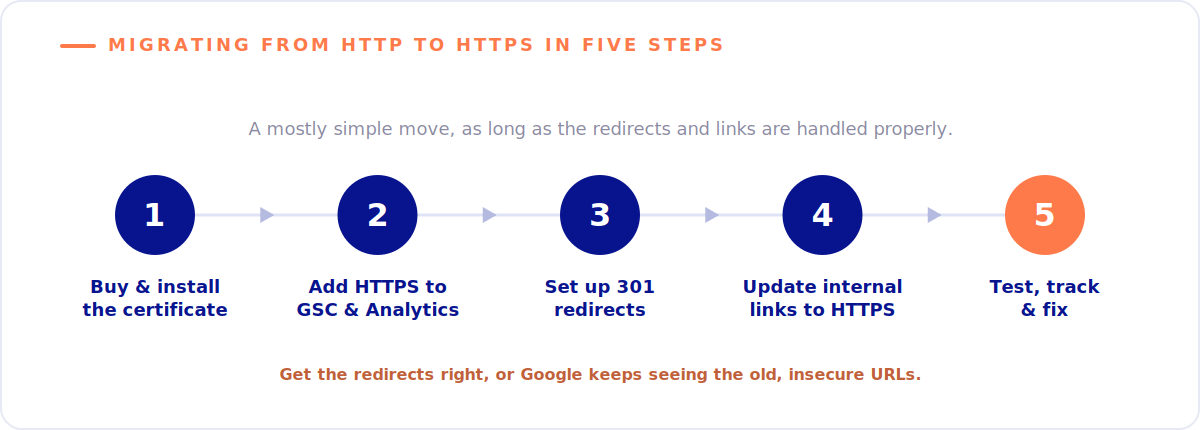
After choosing the right certificate type, follow these steps to migrate from HTTP to HTTPS:
- Buy your certificate from a trusted source and install it. Usually, this can be done via CloudFlare, but you can work with other SSL implementation partners and tools to help you.
- Add the HTTPS version of your site to the Google Search Console and Google Analytics.
- Establish redirects to automatically send people from old HTTP links to your new HTTPS pages. This is very important for SEO. Plugins and professional web agencies can help.
- Adjust your internal links, too, so that they all use HTTPS.
- Test, track, and then fix any other issues left over or links that have not been addressed so far.
It is a mostly easy process, but there are pitfalls to watch for. If you do not correctly fix your links and redirects, for example, you may not benefit from any SEO bonus, as Google will still see your site as insecure. There are also risks of creating duplicate content pages – some with HTTP and others with HTTPS- which can cause confusion among your user base.
Be cautious and detailed when implementing your SSL to avoid these risks, or work with a trusted agency partner.
FAQs about SSL & SEO
1. Does SSL improve SEO rankings directly?
Yes. It is not a huge factor in directly affecting Google rankings, but it contributes to a superior and safer user experience. This helps with SEO performance, as more people will visit and spend time on your site, reducing its bounce rate and engagement metrics.
2. Can a website rank well without an SSL certificate?
Nowadays, it is very unlikely and difficult to rank without SSL. Modern browsers issue user warnings when a user tries to visit an insecure site. That has a negative impact on user trust and traffic, so sites without SSL certificates tend to perform poorly compared to secure alternatives.
3. How does SSL impact website speed?
There are many misconceptions about SSL certificates making sites slow or laggy. In years gone by, SSL has had a notable impact on page loading times, as it takes time to encrypt data. However, modern SSL/TSL technology is much more efficient and has a negligible impact on loading times.
4. What happens if I don’t switch to HTTPS?
Without SSL/TSL encryption, your site, your users, and all the data that passes from one to the other will be at higher risk of hackers or interception. Additionally, your users may get warnings from their browsers when accessing your site, which can harm traffic and SEO performance.
5. How do I migrate my website from HTTP to HTTPS?
You will first need to obtain an SSL certificate from a trusted source. Then, install the certificate, update all necessary website links from HTTP to HTTPS, and set up redirects for any other links or requests to pass via the HTTPS URL, not the HTTP one.
6. What technical SEO issues can you solve with an SSL certificate?
Getting an SEO certificate will prevent any “Not Secure” browser warnings from showing up to your users. It should also eliminate the risk of mixed content errors and duplicate URL indexing, all while improving security and SEO performance.
Conclusion: SSL, Vital for Security and Helpful for SEO
Returning to our titular question – Does SSL improve SEO? – the answer is a clear and definitive yes. That is not to say that getting an SSL certificate will instantly push your web pages to the top of Google’s rankings. However, it will have a positive overall impact in the long term, aiding with site engagement, trust, and user experience.
So, if you are eager to improve your SEO and security and stand among your user base, do not delay. Consult us today for help obtaining and implementing your SSL certificate, plus assistance in building a winning SEO strategy.